
Eligible subscriptions let you change plans through your WebInk account. Start from the existing subscription so the change is linked to the service you already have.
Start here: Log in to your WebInk account using the email address or username associated with your service.
1. Open your subscription
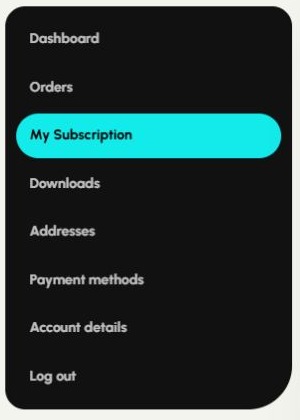
Choose My Subscription. If the menu says Subscriptions, choose View beside the correct service.
2. Find Upgrade or Downgrade
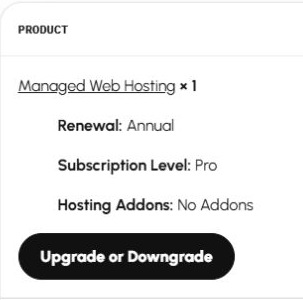
Scroll to Subscription totals. Under the service or product name, select Upgrade or Downgrade.
3. Choose an available plan
On the service page, choose the plan and other options offered for the switch. Review the new service level and billing interval, then select Switch subscription when shown.
4. Review and complete checkout
Check the amount due now, recurring price, billing frequency and any next-payment information. Proration, credits and timing depend on your plan and the switch shown at checkout. Confirm only when those details match the change you want. Selecting a plan alone does not complete the switch.
5. Check your updated service
After the confirmation page, return to your account and open the subscription. Confirm the service level, recurring total and billing details. Contact WebInk if the account does not show the expected change.
No Upgrade or Downgrade option?
Some services or subscription statuses do not support self-service switching. Contact us with your current service and the plan you want. We can confirm the available options and any effect on your service before you proceed.
If you want to end the service instead, follow the cancellation guide. You do not need to cancel first to use an available Upgrade or Downgrade option.
Need help? Email hello@webink.solutions or contact WebInk. Include the service name and your account email. Keep card numbers, security codes and passwords out of your message.
Related help
Screenshots show the WebInk account controls as of October 27, 2026. Available actions vary by service, subscription status and payment method.